What is identity and access management (IAM)?
Most enterprise security teams run an identity and access management (IAM) platform and deploy some form of Multi-Factor Authentication (MFA) on top of it. Yet, only 21% of companies deploy phishing-resistant MFA after suffering a breach, per Forrester’s 2025 Security & Risk Summit. That leaves almost 80% of organizations making IAM policy decisions based on credentials that attackers can compromiseintercept even with limited technical capabilities.
The gap is structural. IAM platforms govern who should have access and to what, but the authenticator types which those platforms accept, is a key decision most organizations have not made deliberately, or undervalue. A platform may enforce permissions correctly while still relying on authentication methods vulnerable to phishing, session theft, or MFA bypass.
Until security teams treat the authenticator as a deliberate architectural choice rather than an afterthought, the rest of the IAM stack is only as strong as the credential attackers already know how to steal.
Two key functions that define IAM
IAM itself combines two core functions: authentication, which verifies a user or system’s credentials, and access control, which determines what that identity can reach or access.
These functions sit behind many of the actions employees perform every day, from signing into ERP or accounting systems, to approving payments and logging into cloud infrastructure. IAM platforms manage capabilities like single sign-on (SSO), MFA, privileged access controls, and role-based permissions to decide who should have access, under what conditions, and to which systems.
Why IAM has become a core security layer for modern teams
As cloud apps, remote work, mobile devices, contractors, and third-party integrations became the norm, access decisions have moved outside the traditional network boundary, traditionally defined as the corporate perimeter. A SaaS application now has to authenticate users independently, often from devices the organization does not fully control.
As a result, identity has become one of the primary security layers in modern enterprise environments. That shift is a major reason IAM plays a central role in zero trust architectures, where every access request must be continuously verified regardless of whether it originates inside or outside the network.
Machine identities such as service accounts, API tokens, and autonomous AI agents now outnumber human identities in many cloud-heavy environments, with CyberArk reporting ratios of more than 80:1. With that many identities in play, the way each one is authenticated matters more than ever.
The four functions every IAM program covers
Identification, authentication, authorization, and auditing each answer a different question. Conflating them is one of the most common ways access controls fail.
- Identification – Identification is the initial claim, such as a username, email address, service account, or device certificate (answers “Who is requesting access?”).
- Authentication – Authentication verifies that claim using a password, MFA factor, passkey, or cryptographic proof (answers “Can the system verify that credential?”).
- Authorization – Once an identity is verified, authorization determines what systems, applications, or data that identity can access (answers “What should that identity be allowed to access?”).
- Auditing – Auditing records login activity, access events, permission changes, and other actions so security teams can review what happened later (answers “What actions were taken after access was granted?”).
These functions are not interchangeable.

Organizations often treat authentication and authorization as the same thing. A user successfully logs in, and the system assumes they should have broad access across connected applications or environments, leading to overprivileged accounts that accumulate over time.
The same problem appears when identification is treated as proof of identity. A username or device ID only tells the system who is claiming access. Without strong authentication behind it, the system has no reliable way to verify the claim itself.
These gaps grow over time because IAM controls extend across the full identity lifecycle, including onboarding, daily access, privilege changes, account recovery, and offboarding. That is also why the strength of the authentication method underlying each step shapes how well the rest of the program holds up.
How the IAM market is structured
Different IAM tools solve different problems. Most enterprise IAM programs typically span five major categories:
- Access management (AM) – Handles SSO, MFA, adaptive authentication, and federated identity across cloud and on-premise applications.
- Identity governance and administration (IGA) – Manages joiner-mover-leaver workflows, role assignments, access reviews, and user lifecycle controls.
- Privileged access management (PAM) – Secures administrative accounts through credential vaulting, just-in-time access, session monitoring, and elevated access controls.
- Identity threat detection and response (ITDR) – Detects identity-related attack activity such as credential stuffing, impossible-travel logins, privilege escalation, and lateral movement.
- Identity security posture management (ISPM) – Continuously evaluates identity configurations, exposed permissions, orphaned accounts, and non-human identity risks.
Access management alone leaves gaps: The Verizon Data Breach Investigations Report found that credential stuffing accounted for a median 19% of daily authentication attempts against SSO providers in 2025.
At the same time, service accounts, API tokens, workloads, and AI agents have expanded the number of non-human identities organizations must manage. Those risks often sit outside the visibility of traditional access management tools, which is why categories like PAM, ITDR, and ISPM have become increasingly important in modern IAM programs. Across all five categories, though, the assurance level starts with how identities are authenticated in the first place.
Weak authentication also weakens the entire IAM stack
Many organizations still rely on authentication methods that remain vulnerable to phishing and credential theft. Even a correctly configured IAM platform, but running weak authentication such as password only, SMS or push-based MFA, can be easily exploited by attackers.
Phishable authentication methods still dominate
Yubico’s 2025 Global State of Authentication Survey found that 56% of employees globally still use traditional passwords as their primary work authentication method.
User trust in weaker authentication methods remains high
User misperception continues to slow the adoption of phishing-resistant authentication. The same survey found that 41% of respondents considered SMS-based authentication the most secure method, despite the well-documented risks around attacker-in-the-middle (AitM) relay, SIM swapping, SS7 exploitation, social engineering, and OTP interception.
Conversely, confidence in stronger authentication methods remains comparatively lower. Yubico’s country-level findings showed confidence in hardware security keys and passkeys as the most secure option only amounted to 37% in the UK and 34% in the US in 2025.
How attacker-in-the-middle phishing bypasses MFA
An attacker-in-the-middle (AitM) attack, also known as man-in-the-middle (MitM), relays authentication codes in real time through a proxy that mirrors the legitimate site. This can be done via widely available tools such as EvilProxy, Tycoon2FA, and Evilginx.
SMS-based MFA is phishable because the code carries no contextual information about which user or site requested it, so a code generated for a legitimate site can be perfectly captured and replayed against one that has been staged to deceive the user. The underlying issue is the absence of an additional form of MFA that proves that the requesting user has physical possession of a registered authenticator or can present a unique and difficult to reproduce physical trait, such as a fingerprint. Origin binding within the authentication protocol also fortifies the level of trust between the user and the relying party, ensuring that both parties are legitimate and there are no harmful proxies, mirrors or fake sites sitting in between.
Why stolen credentials remain so dangerous
Credential theft still plays a major role in enterprise breaches. According to the Verizon DBIR 2025, credential abuse accounted for 22% of breaches, while 54% of ransomware victims had credentials exposed in infostealer logs.
One reason these attacks persist is that stolen credentials often remain usable long after the initial compromise. IBM’s Cost of a Data Breach 2025 report found a 9% year-over-year decrease in average breach lifecycle, driven by faster identification and containment.
That combination creates a difficult reality for IAM teams: once attackers gain access to valid credentials or sessions, the window to detect and stop lateral movement becomes extremely small, and the rest of the IAM stack inherits that weakness from the underlying authentication method.
The help desk is the recovery gap most IAM buyers miss
One of the most persistent enterprise identity attack patterns does not target the authenticator directly, but rather, it targets the recovery process around it.
If help desk verification and account access override relies on information that attackers can research or collect, such as phone numbers, employee details, or knowledge-based questions, even phishing-resistant authentication loses much of its value, once the recovery flow begins.
Threat groups such as Scattered Spider (also tracked as UNC3944) have repeatedly used social engineering against enterprise help desks, by calling and asking to reset or disable MFA on a target account. Publicly reported targets have included MGM Resorts properties such as MGM Grand, Mandalay Bay, Bellagio, and Aria, costing roughly $100 million in losses. Them CISA advisory shows how these attacks relied heavily on impersonation, open-source research, and help desk manipulation rather than pure technical exploitation.
Enrollment and recovery flows are now part of the attack surface
Attackers increasingly target onboarding and identity verification workflows because obtaining the first credential is often easier than bypassing an existing authenticator. Synthetic identities, deepfake-generated video calls, and impersonation attacks have expanded the risk around remote employee verification and MFA enrollment.
Many IAM programs now evaluate identity proofing alongside authentication strength. For example, Yubico’s Bring Your Own IDV strategy focuses on securing even the enrollment and recovery stages that phishing-resistant MFA alone does not fully solve.
IAM controls have to extend across the full identity lifecycle
The same lifecycle risks appear during offboarding. Orphaned accounts, unmanaged recovery methods, and forgotten service access can remain active long after employees leave an organization if improperly managed.
When that happens, an IAM program can look strong on paper even as residual access remains in places attackers commonly target. Lingering identities often include contractor accounts, shared mailbox access, SSH keys, API tokens, privileged groups, and break-glass credentials that were never tied to a single owner. Even if the primary directory account is disabled, side doors can remain through cached sessions, unmanaged recovery factors, and third-party SaaS apps that keep their own user records.
The practical fix is to treat offboarding as a sequence of verifiable steps, not a single ticket closure. Good programs maintain an inventory of human and non-human identities, automate deprovisioning across the IdP and downstream apps, and require owners for service accounts and recovery paths. Periodic and consistent auditing matters here because it is the backstop that proves access was actually removed: last login timestamps, token revocation, group membership changes, and app-level deactivation give security teams a clear record before an external audit or incident forces the question.
What to evaluate before expanding your IAM stack
Expanding an IAM program now involves evaluating how identities are verified, how privileges change over time, how recovery workflows operate, and how identity risks are monitored after access is granted.
Those gaps are also becoming compliance issues as frameworks such as NIST SP 800-63-4, Cybersecurity Maturity Model Certification (CMMC 2.0), Payment Card Industry Data Security Standard (PCI DSS 4.0), Health Insurance Portability and Accountability Act (HIPAA), and the EU’s Network and Information Security Directive (NIS2) directive place more scrutiny on authentication strength and identity governance.
Before evaluating new IAM vendors or expanding your stack, start with these four questions.
Q1: Does the authenticator resist phishing and credential replay?
Not all passkeys provide the same level of protection. NIST SP 800-63-4 places stronger emphasis on phishing-resistant authentication methods that use cryptographic verification and non-exportable credentials.
FIDO2 and passkeys refer to the same standard: FIDO2 is the technical protocol name, and a passkey is the cryptographic key pair that replaces a password. There are, however, two types of passkeys, and the distinction matters when evaluating authenticator assurance.
Synced passkeys store the private key in a cloud-synced store (such as Apple iCloud Keychain, Google Password Manager, or a third-party password manager). Credentials are expected to be copied across a user’s devices through, what the FIDO Alliance and NIST both refer to, the sync fabric. This adds convenience but introduces additional attack surface, as security becomes largely dependent on the sync provider’s own security measures: a compromise of the cloud account behind the sync fabric could expose credentials across every synced device.
Device-bound passkeys store the private key on a single device within a hardware-backed secure element. The private key never leaves said device, and the FIDO2 protocol’s origin binding makes credential interception or replay computationally unfeasible. Hardware security keys, including YubiKeys using FIDO2/WebAuthn, fall into this category. This removes the sync-related attack surface entirely but requires users to manage access across devices and maintain backup authenticators.
It is important to note that for both passkey types, the private key is never directly exposed to the user. The core trade-off is between the convenience of cross-device sync and the stronger assurance that comes from keeping credentials bound to a single piece of hardware.
Q2: What is the identity lifecycle posture?
Access controls only work if permissions stay aligned with real workforce changes. This often breaks down during onboarding, internal transfers, hiring contractors, and offboarding of employees.
- An employee who moves from finance to operations may keep access to payment systems they no longer use.
- A contractor account created for a short-term project may stay active even months after the engagement ends.
- Service accounts tied to old integrations often remain enabled long after the underlying workflow is retired.
Over time, these and other gaps create excessive access that security teams don’t notice until an audit or incident investigation surfaces it.
Identity governance controls help organizations automate joiner-mover-leaver workflows, access reviews, role changes, and deprovisioning so permissions do not quietly accumulate across the environment.
Q3: How do the access controls enforce least privilege?
Least privilege means users, applications, and service accounts should only have access to the bare minimum of systems and actions required for their role.
Basic role-based access control (RBAC) handles part of that problem by assigning permissions based on job function. But static roles alone rarely reflect how modern organizations operate.
- A finance employee may need temporary access to a payroll system during quarter close.
- A cloud administrator may require extra privileges for a production change window.
- A contractor may need access to one internal application without having access to other systems.
Attribute-based access control (ABAC) adds context such as device health, location, time of access, or network conditions.
Just-in-time access limits elevated privileges to a defined task or timeframe instead of granting standing administrative access. Segregation-of-duties policies prevent users from holding combinations of permissions that could create fraud, compliance, or operational risks.
Q4: Is the identity posture monitored and recoverable?
As help desk resets, MFA re-enrollment, and account recovery workflows are now common targets in identity-focused attacks, strong authentication alone does not prevent identity compromise if recovery workflows remain weak or suspicious behavior goes undetected.
ITDR and ISPM tools can help security teams identify credential abuse, anomalous login behavior, privilege escalation, exposed identities, and configuration weaknesses.
How enterprises should roll out phishing-resistant authentication

Most organizations start by securing higher-risk systems and users first, then expand gradually across the rest of the workforce. That process often involves balancing legacy applications, recovery workflows, compliance requirements, and everyday usability.
Start with privileged accounts and high-risk systems
Rollouts usually start with administrators, VPN access, cloud infrastructure, and environments tied to PCI DSS, CMMC, or HIPAA requirements since they create the most risk if compromised.
Phased deployments also give security teams time to test recovery workflows, device compatibility, enrollment processes, and user support before expanding phishing-resistant authentication across the broader workforce.
Different user groups also need different approaches.
- Shared-workstation environments may need fast tap-and-go login flows.
- Contractors may only need temporary access to specific systems.
- Older applications without WebAuthn or FIDO2 support may require temporary bridge solutions during migration.
For organizations ready to accelerate their adoption of phishing-resistant and passwordless authentication to secure digital identities and the IAM stack, YubiKey as a Service enables simple and scalable global deployment of YubiKeys for your workforce, supply chain, and end customers.
You also get access to turnkey Enrollment and Delivery services. Enrollment services help IT onboard users with YubiKeys quickly, handling credential provisioning for new users and fast-tracking the organization to phishing-resistance. Delivery services help IT distribute keys effortlessly to end users across both residential and office locations around the world.
Recovery planning matters as much as deployment
Organizations still need reliable processes for lost devices, failed enrollments, employee turnover, and account recovery. Otherwise, attackers target the fallback process instead of the authenticator itself.
Many organizations now issue backup authenticators during onboarding so recovery does not rely entirely on help desk resets. Others strengthen identity verification for remote onboarding and MFA re-enrollment requests.
The goal is to keep the entire identity lifecycle trustworthy when users lose devices, change roles, leave the company, or need urgent access restoration.
Two checks to start with today
The four questions above frame the evaluation. These two checks tell you where to start this week.
IAM is often framed as a platform decision, but the more useful framing is that it is a ceiling decision. The highest assurance level your access program can reach is bounded by the authenticator it accepts at the door. A category-leading platform running phishable MFA operates at exactly the assurance level of that phishable MFA.
Start with two concrete checks:
- Audit your authenticator coverage. Confirm whether your IAM platform requires FIDO2/WebAuthn or PIV for every account a phishing-resistant protocol can reach today, starting with privileged accounts and expanding from there.
- Stress-test your help desk reset flow. Verify that identity recovery confirms who someone is against something other than a phone number or detail the caller controls.
Those two checks are the minimum starting point for alignment with NIST SP 800-63-4 AAL3, PCI DSS 4.0, CMMC 2.0 Level 2, and the December 2024 HIPAA Security Rule NPRM. Closing the gap starts with the authenticator you put in front of every identity.
Where Yubico fits in the IAM stack
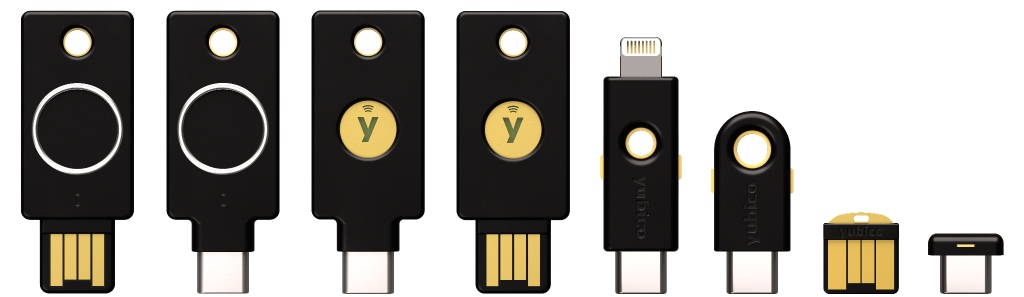
Yubico co-created the FIDO authentication standards, and YubiKeys integrate with IAM platforms such as Okta, Microsoft, and Duo, creating phishing-resistant users without replacing the existing IAM stack. YubiKeys provide phishing-resistant authentication when used with FIDO2/WebAuthn or Smart Card/PIV protocols, and also support FIDO U2F for second-factor use cases.
- YubiKey 5 Series: The broadest protocol support available, covering FIDO2, FIDO U2F, Smart Card (PIV), OTP, and OpenPGP. Works across modern cloud services and legacy on-premises systems, making it the standard choice for mixed environments across all user types.
- YubiKey 5 FIPS Series: The same multi-protocol key with FIPS 140-2 validation (FIPS 140-3 validation pending), specifically mandated for federal employees and contractors and adopted in regulated healthcare and finance environments and other regulated industries.
- Security Key Series: A FIDO-only key for organizations running modern cloud-based identity stacks. Lower cost per seat makes it practical for broad rollouts where legacy protocol support is not needed.
- YubiKey Bio Series: For organizations looking to reduce friction in high-frequency authentication workflows along with biometric verification. For environments where login convenience is a priority, the YubiKey Bio Series streamlines the login experience with on-device fingerprint verification, making authentication as fast as a touch and go. The YubiKey Bio Series has two key options. YubiKey Bio Series – FIDO Edition and YubiKey Bio Series – Multi-protocol Edition.
- YubiKey Bio Series – FIDO Edition: With support for both biometric- and PIN-based login, this key leverages the full range of multi-factor authentication (MFA) capabilities outlined in the FIDO2 and WebAuthn standard specifications.
- YubiKey Bio Series – Multi-protocol Edition: Offers all of the benefits of the FIDO Edition lineup along with additional capabilities enabled through its multi-protocol support. Protocols this key support are FIDO2, as well as PIV Smart Card. The YubiKey Bio Series – Multi-protocol Edition lineup is available exclusively via YubiKey as a Service, and included within the Compliance tier.
Customer proof points
Retail Control Systems (RCS) layered YubiKeys onto its existing Duo deployment across a PCI-regulated environment managing more than 2,500 identities. The rollout focused on strengthening authentication inside an existing IAM environment rather than rebuilding it from scratch.
Hyatt leveraged passwordless to reduce risk & elevate the guest experience Microsoft Office 365 and Entra ID (Azure Active Directory) Premium worked well for identity and access management, but Hyatt’s mobile-based MFA with one-time passwords created massive frustration. Employees began tapping “approve” on every prompt— leaving the company vulnerable to phishing and man-in-the-middle attacks due to MFA fatigue. When customer-facing employees in hotel lobbies used their phones to approve an MFA prompt, it appeared they were using them for personal reasons—which is not an image Hyatt wanted to convey. Hyatt turned to the YubiKey’s phishing-resistant MFA to protect:
• All applications that contain personally identifiable information (PII) and cardholder data
• Call center and loyalty program employees who work in mobile-restricted environments or remotely on insecure networks
• Access to privileged access management (PAM) and enterprise resource planning (ERP) systems
• Vendors who play a critical role in Hyatt’s supply chain security
Okta rolled out YubiKeys to their entire 6,000+ global workforce using FIDO Pre-reg as part of YubiKey as a Service. Okta, an industry leader in identity and access management, adopted FIDO Pre-reg in 2024, deploying YubiKeys to its global workforce to ensure phishing-resistant authentication. The main reasons for Okta choosing Yubico are because of Yubico’s reputation as a leading hardware security key manufacturer and their need for a large-scale, global, solution that had the highest level of phishing-resistant assurance. The goals for their deployment hinged on providing phishing-resistant onboarding, consistent recovery processes, and efficient security without increasing admin overhead. Their key challenges included manual onboarding of recovery factors, logistical challenges with a global workforce, lack of policy mandates and no roaming authenticator.
“At Okta, we’re on a mission to ditch the password. As you’d expect, we use Okta FastPass for passwordless authentication for our global workforce. With Yubico, we saw an opportunity to leap the final hurdle to deliver an end-to-end passwordless experience.” – David Bradbury Chief Security Office, Okta

6,000+ YubiKeys delivered in 4 months

100% coverage for new and existing employees

42 countries served

Zero admin overhead for recovery
Further A commissionedForrester Total Economic Impact studymodeled a composite YubiKey customer achieving 99.99% Reduction in exposure to phishing and credential theft, 90% Fewer help desk tickets, 265% ROI and $5.3M NPV over three years. See thefull reportor thepress releasefor more information.