Key Takeaways
- FIDO2 Eliminates the Root Cause of Credential Theft. Unlike legacy multi-factor authentication (MFA) that relies on vulnerable “shared secrets” like passwords and one-time codes, FIDO2 uses public key cryptography. The private key is never directly exposed to the user, making it phishing-resistant and neutralizes the primary vector for data breaches.
- FIDO2 Supports Multiple Authenticator Types. FIDO2 supports built-in authenticators (like Face ID), synced passkeys, and highly portable, external hardware security keys. Hardware security keys in particular, are purpose-built for security, and isolate cryptographic keys from the host computer and mobile device’s OS and software, protecting them from most forms of compromise.
- Hardware Security Keys Provide the Highest Level of Assurance. Hardware security keys are essential for meeting stringent compliance mandates like NIST AAL3. They are the only viable option for shared workstations and mobile-restricted environments. Hardware security keys also provide the most consistent security for remote workers, executives, IT staff, third-party vendors, and end customers.
- Phishing-resistant MFA is a Foundational Requirement for Zero Trust. Modern security frameworks like Zero Trust and government mandates (e.g., OMB M-22-09) demand phishing-resistant MFA. Only FIDO2 and Smart Card/PIV authentication protocols provide the technical backbone needed to achieve compliance, while improving user experience and reducing IT helpdesk costs.
Successful Implementation Requires a Plan for Recovery and Legacy Systems. Users must register both primary and backup authenticators to prevent lockouts. Multi-protocol hardware security keys that support both FIDO2 and traditional standards like PIV/Smart Card enable phased modernization, enabling a transition away from legacy systems over time.
The Authentication Paradox: Why Adding Layers Isn’t Working
Credential-based attacks remain the root cause of the most damaging security breaches. For years, organizations have tried to bolt on security with legacy multi-factor authentication (MFA) methods like SMS and one-time passcodes (OTPs), only to find them vulnerable to the same social engineering and phishing attacks they were meant to prevent. Even authenticator apps have been breached repeatedly, leading to security bodies urging their use only for low value accounts.
The fundamental problem is the continued reliance on “shared secrets:” pieces of information, like passwords or codes that can be stolen and used by an attacker, intercepted, or bypassed remotely.
Yet according to Yubico’s 2025 Global State of Authentication Report, the disconnect between perception and reality remains stark. A significant portion of employed adults still believe simple usernames and passwords or SMS-based codes are the most secure authentication methods. Even more concerning, the majority of employees whose companies use inconsistent security measures still believe their organization’s cybersecurity is adequate.
This isn’t a failure of user education. It’s a fundamental flaw in how authentication has been architected since the early days of the internet.
The”Shared Secret” Problem
Every legacy authentication method, from passwords to SMS codes to authenticator apps, relies on what cryptographers call “shared secrets.” These are pieces of information that both the user and the service know and can verify. The problem is that anything shared can also be stolen, intercepted, or socially engineered away.
AI is now supercharging this attack vector. Modern phishing attacks leverage AI-powered tools that enable even non-technical criminals to create convincing fake login pages or emails in minutes. As concern about AI-driven threats continues to grow globally, the need for authentication methods that are resistant to these evolving techniques becomes critical.
What is FIDO2?
FIDO2 (Fast Identity Online) is a set of open authentication standards that enables secure, passwordless and multi-factor authentication. It is developed and maintained by theFIDO Alliance and the World Wide Web Consortium (W3C), a collaboration of hundreds of technology companies including Microsoft, Google, Yubico, and Apple, to standardize strong authentication across all platforms and devices.
The power of FIDO2 comes from two core standard components that work together:
- WebAuthn (Web Authentication): This standardized web API is built into modern web browsers like Chrome, Firefox, Safari, and Edge. It gives web applications a secure, standardized way to handle registration and authentication using public key cryptography, without needing to know the specifics of the user’s authenticator.
- CTAP (Client to Authenticator Protocol): This protocol enables a client device such as a laptop or smartphone to communicate directly with an authenticator, like a hardware security key, over transports like USB, NFC, or Bluetooth. It defines the low-level commands that are used by the operating system or browser to perform authentication operations.
Together, WebAuthn and CTAP form the FIDO2 standard, creating an interoperable ecosystem where users can securely log in to online services using a variety of authenticators without relying on vulnerable passwords.
To maintain compatibility while driving innovation, the FIDO2 framework also incorporates its predecessors:
- FIDO U2F (Universal 2nd Factor): The original FIDO standard focused on providing a strong second factor to supplement a password. Under FIDO2, U2F was carried forward as CTAP1 (Client To Authenticator Protocol), so many U2F-only keys remain usable for 2FA via WebAuthn’s backward compatibility in modern browsers and relying parties.
CTAP2: Enables passkeys (discoverable credentials) and richer flows, supporting passwordless or MFA. User verification (PIN/biometric) happens on the authenticator.
How FIDO2 Delivers Phishing-Resistant Authentication
FIDO2’s security model is fundamentally different from legacy systems. Instead of proving users know a secret, users need to prove they possess a private key. The technology is rooted in public key cryptography, a proven method that eliminates server-stored shared secrets for login. The entire process is designed to ensure that the secret material is never exposed or able to be exfiltrated, which creates a considerable barrier for hostile actors to overcome.
Registration: Creating Unique Credentials for Each Service
When you register with a FIDO2-enabled service (known as a relying party) for the first time:
- Your authenticator (security key, device biometric, etc.) generates a unique cryptographic key pair specific to that relying party.
- The private key is secured within a cryptographically protected container, such as an authenticator’s secure hardware (for device-bound keys) or provider’s cloud (for synced keys).
- The public key is sent to the relying party and associated with the account.
- The relying party can verify signatures made by the private key but cannot recreate the private key from the public key.
The mathematical one-way nature of public key cryptography ensures that deriving the private key from its openly shared public key is computationally unfeasible, establishing the fundamental security guarantee of digital communications.
Authentication: Challenge-Response Without Exposing Secrets
When you return to log in:
- The relying party sends a unique challenge or nonce (a random string of data) along with your user handle to the browser.
- The browser passes this along to the authenticator via the WebAuthn API.
- You provide user verification (fingerprint, PIN, or touch, depending on policy requirements) to the authenticator.
- The authenticator signs a package of data that includes the challenge, along with the relying party’s ID, the user handle, and flags that, among several things, indicate whether the user was present or verified to the authenticator.
- The browser ensures the relying party’s ID matches the requesting service, preventing a man-in-the-middle or fake website.
- The relying party uses the stored public key to check the signed data package was created by the corresponding private key. Mathematically, this check is only successful if the signature came from the unique private key that matches the public key, and no other value. If successful, your identity is confirmed, and access is granted.
Why This Stops Phishing
Traditional phishing works because attackers can trick users into entering credentials on fake websites, then replay those credentials on the real site. With FIDO2, this attack fails because:
- The signature is cryptographically bound to the relying party’s domain.
- Even if a user is fooled by a fake site, the authenticator will only sign challenges for the legitimate domain and thus cannot be fooled.
- There are no secrets for the attacker to steal and replay, as only the signature is available and never the underlying private key
This cryptographic process makes FIDO2 inherently phishing-resistant. The signature is bound to the relying party and the request’s origin; requests from a different domain can’t obtain a valid assertion, thus standard credential-phishing sites will always fail.
Understanding Scope and Limitations
It’s important to be precise about what FIDO2 protects against and what remains outside its scope:
FIDO2 prevents: Credential phishing, credential stuffing, man-in-the-middle (MiTM) attacks during authentication, and password database breaches.
FIDO2 does not prevent: Endpoint compromise (malware on the user’s device), session hijacking after successful authentication, or social engineering for account recovery, assuming a less secure authentication method is available as backup.
In other words, FIDO2 ensures attackers can’t get in by stealing credentials. However, if your computer is already compromised or someone steals your session after you’ve logged in, that’s a different security problem requiring endpoint protection and session management controls.
This distinction is critical for security architects building defense-in-depth strategies.
The Passkey Ecosystem: Authenticators and Protocols
The term “passkey” has emerged as a user-friendly way to describe FIDO credentials. A passkey is the cryptographic key pair that replaces your password. While all passkeys are based on the modern FIDO2 standard, not all passkeys provide equal security. The choice of authenticator significantly impacts your security posture.
Passkeys support different types of authenticators to fit various use cases and security requirements. These authenticators fall into two main categories:
- Platform or Built-In/Local Authenticators
- Roaming or Cross Platform Authenticators
Platform or Built-In/Local Authenticators
These are built directly into a user’s device. Examples include Windows Hello on laptops, or Face ID and Touch ID on Apple devices (i.e. iPhone, iPad, Mac). They provide a convenient login experience but are tied to that specific device. The FIDO credential can be stored in a hardware secure element, but dependent upon the capabilities of the underlying device.
Roaming or Cross-Platform Authenticators
These are portable, external devices that can be used across multiple systems. The most common example is a hardware security key, a purpose-built security device that connects via USB or NFC. Because they store the private keys in a dedicated, hardened secure element, hardware security keys provide the highest level of security. They are isolated from the operating system of any connected host machine, making them immune to malware or OS-level compromises. This makes them ideal for securing high-value accounts and for use in environments where mobile devices are restricted. Roaming authenticators are commonly certified by the FIDO alliance for conformance and security assurances.
The definition of an authenticator that protects passkeys has become blurred. As an example, a passkey stored on a mobile device can be considered both a platform and a cross-platform authenticator since it can be used to perform authentication actions on another device. Unlike purpose-built security keys, mobile devices use varying storage methods depending on the manufacturer and model.
Synced vs. Device-Bound Passkeys
Beyond the authenticator type, passkeys can be categorized by their storage method:
Synced passkeys are encrypted and synchronized across a user’s devices through an end-to-end-encrypted cloud service (e.g., iCloud Keychain or Google Password Manager), sometimes even referred to as the “sync fabric.” This provides convenience but introduces additional attack surface through the sync mechanism and security becomes largely dependent on the provider’s own security measures.
Device-bound passkeys are stored on a single device and never leave it. This describes hardware security keys, and they’re also common with platform authenticators. They provide maximum security but require users to manage multiple devices or have backup methods established before a device is lost.
Learn more the differences between synced and device-bound passkeys.
FIDO2 Authentication in Challenging Real-World Environments
Roaming authenticators, specifically hardware security keys, provide phishing-resistant authentication where platform authenticators or mobile-based methods may be impractical or disallowed. While platform authenticators and mobile devices offer convenience in an office setting, they can run into operational limitations in many critical operational environments.
Consider these common scenarios where phone-based authentication is impractical or insecure:
- Shared Workstations: In environments like hospital nursing stations, retail point-of-sale terminals, or call center floors, employees share a single computer terminal. Tying authentication to the device’s platform authenticator is often operationally difficult in shared or kiosk setups. A portable hardware security key allows each user to carry their own unique phishing-resistant credentials and, with the right session management, switch in and out using a touch or PIN/biometric (per policy).
- Mobile-Restricted and Air-Gapped Zones: For security and safety reasons, personal mobile devices are often prohibited in manufacturing plants, critical infrastructure facilities, and secure government buildings. In these zones, mobile-based MFA is often prohibited by policy. A FIDO2 security key provides a robust, non-mobile authentication method that functions reliably over USB and NFC without cellular or Wi-Fi; note that the backend still needs whatever network your sign-in flow requires.
- Durability and Legacy System Compatibility: Operational technology (OT) and industrial environments demand durability that consumer electronics cannot offer. Many hardware security keys are built for harsh environments. They address the reality of mixed hardware environments, offering a variety of form factors from USB-A and USB-C to NFC to improve compatibility across mixed fleets; actual support depends on OS/browser and the relying party.
Why FIDO2 is the New Standard for Modern Authentication Security
FIDO2 moves authentication from reactive to proactive, addressing the core weaknesses of legacy authentication.
Unmatched Security and Phishing Resistance
FIDO2 inherently neutralizes many online-based web attacks. Since no reusable shared secret is transmitted or stored on the server, phishing, MiTM, and credential-stuffing attacks have nothing useful to replay. This fundamentally changes the security dynamic, making user credentials a point of strength rather than a liability.
Improved and Simplified User Experience
FIDO2 replaces the friction of remembering and typing complex passwords with a simple action like a touch (user presence) and biometric/PIN (user verification). This improves productivity and reduces the burden on IT and security teams. A passwordless login experience typically leads to fewer password-reset tickets when recovery/device-loss flows are well designed.
A Foundation for Zero Trust and Compliance
Zero Trust programs depend on strong verification for every access request. FIDO2 provides high-assurance, phishing-resistant authentication at sign-in and pairs with device posture and conditional access for ongoing checks. It also provides a consistent mechanism to authenticate to various systems, potentially with different credentials, which enables the basic tenets of a Zero Trust architecture. Regulatory and compliance mandates, such as those from the US government (OMB M-22-09), increasingly specify phishing-resistant MFA, with FIDO2/WebAuthn frequently referenced alongside PIV as the only acceptable approaches.
From User to Infrastructure: Aligning FIDO2 with Broader Zero Trust and Compliance Mandates
Hardware-backed FIDO2 strengthens the identity pillar of a Zero Trust program. As a founding FIDO Alliance member and co-creator of FIDO U2F with Google, Yubico developed hardware-backed FIDO2 solutions that strengthen the identity pillar of Zero Trust programs. Phishing-resistant MFA is the non-negotiable cornerstone of any credible Zero Trust strategy.
Government mandates, including the U.S. White House’s OMB M-22-09, requires phishing-resistant MFA for U.S. agencies and explicitly references PIV and WebAuthn/FIDO2 as acceptable approaches. For federal agencies and contractors requiring compliance, the cryptographic module within a FIDO2 authenticator must be validated under the FIPS 140-3 standard (successor to FIPS 140-2) to ensure its underlying encryption hardware meets stringent government security requirements. This sets a clear benchmark for the private sector on what constitutes strong authentication.
For technical leaders, the choice of authenticator directly impacts the ability to meet these rigorous standards.
- Meeting Compliance and Reducing Risk: Demonstrating the use of high-assurance, hardware-backed FIDO2 authenticators helps demonstrate strong authentication for PCI DSS, HIPAA, CMMC, and GDPR, but does not by itself ensure compliance. Many cyber insurance providers now require MFA and favor phishing-resistant methods, improving eligibility and underwriting outcomes.
- Achieving High Authenticator Assurance Levels (AAL): The NIST Digital Identity Guidelines (SP 800-63-4) define Authenticator Assurance Levels, with AAL3 representing the highest level of confidence and often leveraging cryptography validated under the Federal Information Processing Standard 140-3. AAL3 requires two factors and a hardware-based authenticator with phishing resistance and FIPS 140-validated crypto for government employee and contractor use. Many other countries follow the US guidance. A separate ‘hard token’ is one way to meet this; simply unlocking a smartphone does not count as a second factor. YubiKeys meet AAL3 requirements when deployed in an approved multi-factor configuration (e.g., YubiKey FIPS models).
- NIST SP 800-63-4 is the 2025 update to the Digital Identity Guidelines, focusing on improved security, equity, and usability for government digital identity systems by emphasizing stronger phishing-resistant authentication (like passkeys), updated password recommendations favoring longer lengths, better fraud prevention, and more inclusive identity verification. It addresses lessons learned from the previous revision.
FIDO2 forms the standard; and hardware security keys are the highest-assurance authenticator—often the simplest path to phishing resistance and AAL3. This alignment of an open standard with high-assurance hardware allows organizations to build a security foundation that is both compliant by design and resilient against future threats.
Implementing FIDO2: Practical Considerations
Support for FIDO2 is built into all major operating systems (Windows, macOS, Android, and iOS) and modern web browsers. For technical leaders, implementation is a matter of integrating it into their identity strategy.
Key use cases driving FIDO2 adoption include:
- Securing the Workforce: Protect access to cloud applications (SaaS), legacy on-premise systems, and virtual private networks (VPNs) for all employees.
- Protecting Privileged Users: Enforce the highest level of authentication for IT administrators, developers, and executives who have access to sensitive systems and data.
- Enabling Secure Mobile-Restricted Environments: Provide secure authentication for frontline workers in manufacturing, healthcare, and hospitality settings, as well as secure government locations where personal mobile phones are not permitted or practical.
- Raising the Standard for Customer-Facing Authentication: Offer a secure and efficient login experience for all commercial and individual end user customers, reducing account takeovers and building trust in all transactions online.
Integration with major identity providers (IdPs) like Microsoft Entra ID,Okta, Cisco/Duo and Ping Identity is widely available, and for custom applications, WebAuthn provides the necessary API for developers to build FIDO2 support directly into their login flows.
Bridging the Gap: Integrating FIDO2 with Legacy Systems for a Phased Rollout
Most organizations operate hybrid environments where cutting-edge SaaS applications coexist with legacy on-premise systems that may not support modern authentication standards natively. An effective FIDO2 strategy doesn’t require “rip and replace.”
Multi-Protocol Approach: Deploy a multi-protocol hardware security key (e.g., YubiKey 5C NFC) that supports FIDO2/WebAuthn and PIV/Smart Card for legacy use cases. If you have no other choice, the multi-protocol security keys also support OTP without the need to require a phone and the cost associated with text. This allows a single authenticator to help secure a diverse range of assets:
- Modern Systems: Use FIDO2/WebAuthn for passwordless or strong MFA (depending on your IdP/app policy) across cloud apps, SSO providers, and modern browsers.
- Legacy Systems: Use the same key’s PIV/Smart Card function for certificate-based authentication to RDP and VPN and, where supported and configured, workstation login on Windows, macOS, and Linux. Note: requires appropriate CA/cert mapping and client/OS support.
This approach enables a phased modernization. Organizations can immediately secure their highest-risk assets and user populations with phishing-resistant methods (FIDO2/WebAuthn and PIV). As legacy systems are updated or replaced over time, the same authenticators can transition to FIDO2-based authentication, ensuring the initial investment provides long-term value and positions the organization for future standards.
Planning for Day Two: A Framework for FIDO2 Account Recovery and Lifecycle Management
A robust account recovery plan is essential for any successful FIDO2 deployment and must be designed before rollout. Because FIDO2 eliminates shared secrets, traditional “forgot password” workflows are obsolete and dangerous. If a user loses their only authenticator, they lose access. Poorly designed recovery processes can reintroduce the social engineering vulnerabilities that FIDO2 prevents.
Best Practice: Multiple Phishing-Resistant Authenticators
Organizations should require all users to register at least two phishing-resistant authenticators during onboarding:
Option 1 – Hardware Primary + Hardware Backup:
- Primary: Hardware security key for daily use
- Backup: Second hardware security key stored securely (e.g., in a desk drawer or home safe)
- Recovery: Users can self-recover using the backup key without IT involvement, and then register and request a new backup once the account is recovered. The existing primary should also be removed from the account
Option 2 – Hardware Primary + Platform Backup:
- Primary: Hardware security key for daily use (establishes trusted credential).
- Backup: Platform authenticator (Windows Hello, Touch ID) registered independently to the service.
- Recovery: Use platform authenticator for account recovery, re-register new hardware key.
Important considerations:
- Hardware key and platform authenticator are registered as independent, parallel authenticators.
- Organizations should verify platform authenticators meet security requirements for their use case.
- Platform authenticators are device-bound. A lost device means lost authenticator
- Hardware keys outlast computers and can bootstrap new devices when upgrading
YubiKey 5 Nano as always-attached option: If using YubiKey 5 Nano as an always-attached authenticator (similar to a platform authenticator), maintain a separate backup YubiKey, since Nano will be lost if the device is lost or stolen.
High-Assurance Recovery for Complete Loss:
For scenarios where users lose all registered authenticators, implement an IT-led recovery process requiring:
- Strong identity proofing through trusted, out-of-band verification. This may potentially require the use of an Identity Verification provider and centrally distributed documents such as a passport or driver’s license.
- In-person verification or video call with manager confirmation.
- Issuance and registration of new hardware security key under controlled conditions.
This “Day Two” planning is critical for user adoption and maintaining security posture. Poor recovery experiences undermine authentication modernization initiatives.
The Path Forward: Building a Passwordless Future
The data from Yubico’s 2025 Global State of Authentication survey shows we’re at an inflection point:
- Confidence in hardware security keys and passkeys as the most secure option surged 20% in the UK (from 17% to 37%) and 16% in the US (from 18% to 34%) in just one year.
- Major technology platforms have committed to FIDO2 standards.
- Government mandates are establishing phishing-resistant MFA as the baseline.
Yet significant gaps remain:
- 60% of survey respondents reported still using passwords for personal accounts; 56% for work accounts.
- 41% trust vulnerable SMS-based authentication.
- 45% haven’t used passkeys simply because they’ve never heard of them.
The technical solutions exist. The standards are mature. The remaining challenge is education and organizational commitment.
Yubico Products and Solutions: Implementing FIDO2 in Your Organization
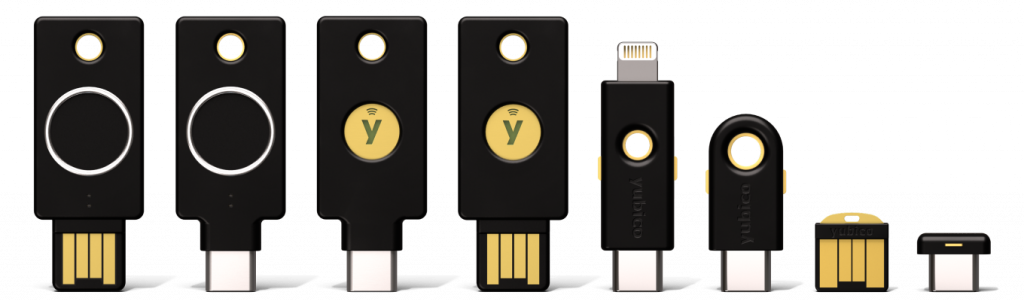
Hardware Security Keys
- The YubiKey 5 Series includes Multi-protocol security keys that support FIDO2/WebAuthn, FIDO U2F, PIV Smart Card, and other protocols—ideal for securing both modern cloud applications and legacy systems mentioned in the “Bridging the Gap” section.
- The YubiKey Bio Series offers biometric security keys with fingerprint recognition for convenient user verification (PIN/biometric) as described in the FIDO2 framework. The YubiKey Bio Series – Multi-protocol edition supports both FIDO and smart card protocols.
- The YubiKey 5 FIPS Series offers FIPS 140-2 validated keys required for AAL3 compliance in government and highly regulated industries. While all YubiKey models can achieve AAL3 in multi-factor configurations, FIPS validation is specifically mandated for federal employees and contractors.
- The Security Key Series offers cost-effective FIDO-only keys for organizations and individuals beginning their phishing-resistant journey.
Enterprise services
YubiKey as a Service provides subscription-based access to YubiKeys with flexible upgrade options, which allows organizations to implement phishing-resistant MFA across their workforce at a predictable cost that’s “less than a cup of coffee per user per month,” addressing the TCO concerns raised in the article.
The shift away from passwords is inevitable. The question isn’t whether your organization will move to FIDO2, it’s when, and whether you’ll lead or lag. As AI-powered attacks continue to evolve, as Zero Trust architectures become standard, and as compliance requirements tighten, phishing-resistant authentication will transition from competitive advantage to operational necessity.
The internet was built on a model of trust that no longer holds. Passwords and other shared secrets are a relic of a different era. FIDO2 provides a standardized, interoperable, and cryptographically secure path forward. By rooting authentication in verifiable hardware and eliminating shared secrets, it offers a robust and user-friendly solution to finally end the threat of credential theft.