EBOOK
Not all MFA is created equal
How modern MFA is more secure than SMS or mobile authentication apps
Legacy MFA such as SMS, OTP and push notification apps don’t stop modern cyber threats
Phishing attacks are on the rise, but not all forms of multi-factor authentication (MFA) are phishing-resistant. Older forms of MFA have been proven to be broken repeatedly as these methods are easily bypassed by attackers using phishing, malware, ransomware, SIM swaps, and attacker-in-the-middle attacks.
“Any form of MFA is better than just a username and password, but most MFA can still be phished. It didn’t take long to realize we needed stronger authentication for all employees that couldn’t be phished.”

Let’s take a look at an example of a phishing attack that’s able to bypass SMS and other software-based MFA.
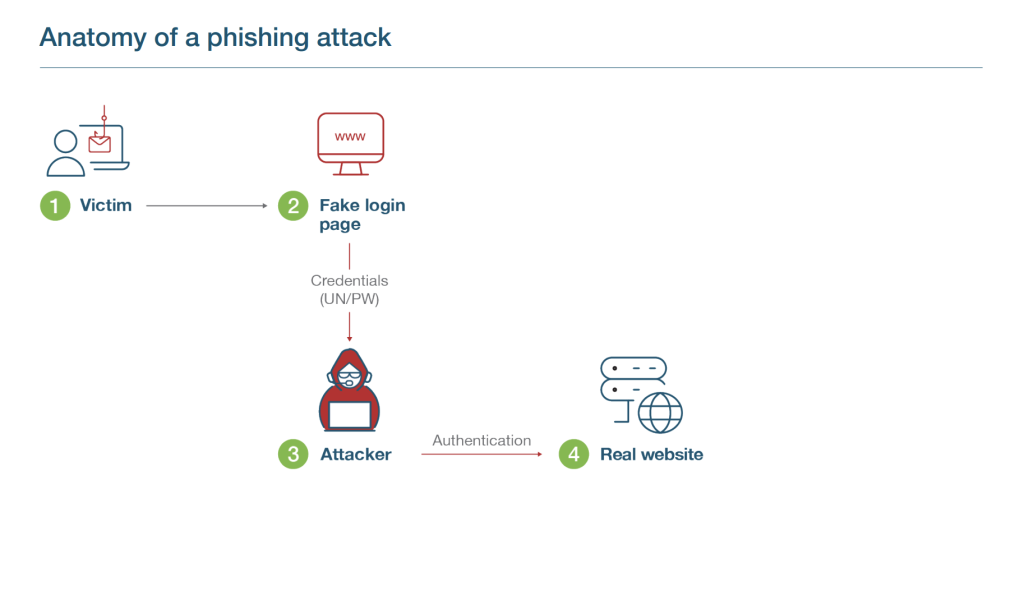
Step 1
- In the upper left hand corner we have our victim. Let’s say that their name is Joe.
- Joe is sent a fake url by an attacker via email or a social post.
Step 2
- Joe clicks on the link which directs them to a fake website, which looks like the real website.
- On this fake website, Joe enters their credentials (UN/PW) thinking they’re logging into the real website.
Step 3
- The attacker through the fake login page gathers credentials.
Step 4
- The attacker then submits the credentials to the real client web portal/login page/website (real server)
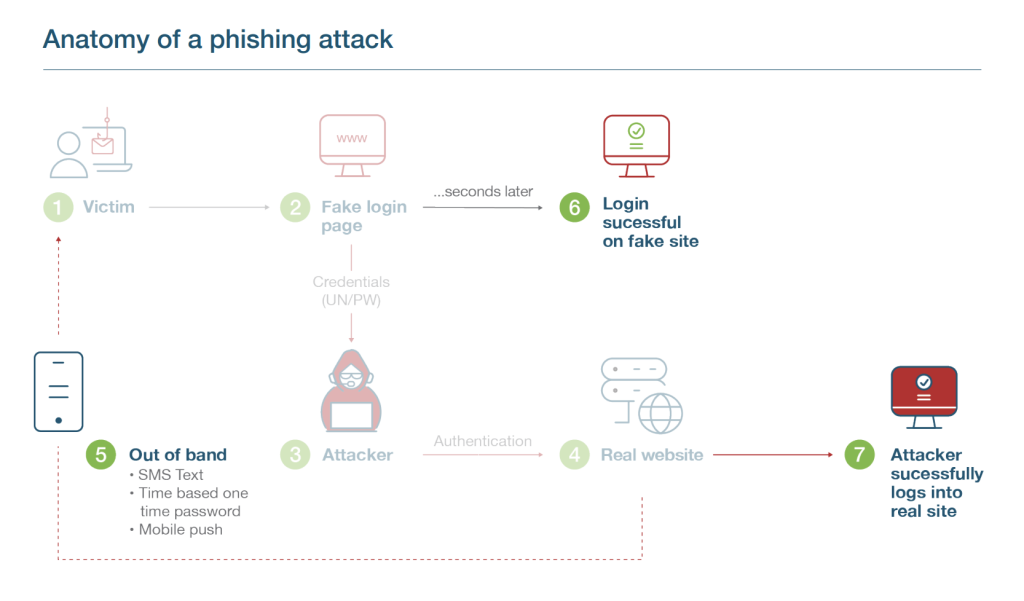
Step 5
- But even if there is 2FA or MFA in place such as SMS, Joe’s account can still be breached.
- The real website triggers the SMS code which is sent to Joe’s phone.
Step 6
- Seconds later, Joe enters this code into the fake website, and is able to login there.
Step 7
- The attacker now grabs this SMS string that Joe has entered, and enters it into the real website, successfully logging in.
- The attacker can even take this one step further.
- The attacker can update the password on Joe’s account and mobile number, locking Joe out completely.
Why and how modern phishing-resistant MFA stops account takeovers
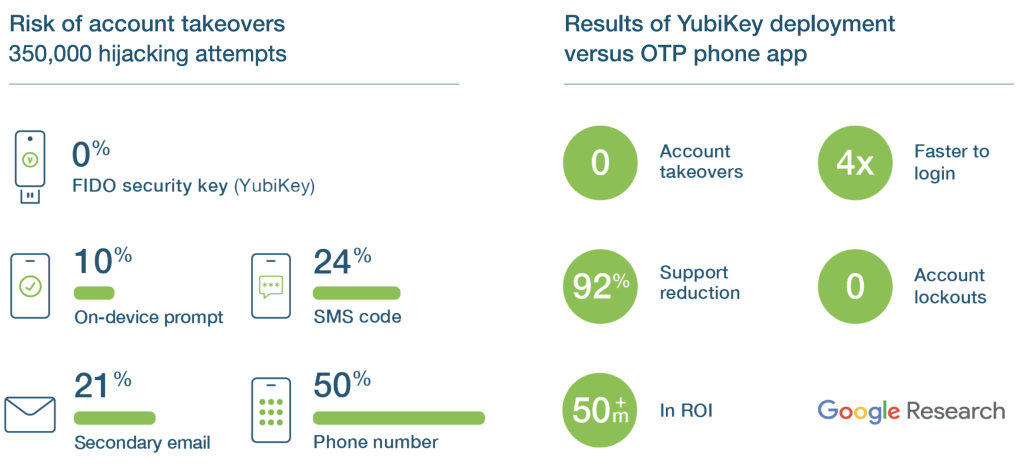
Modern, phishing-resistant MFA, offered only by FIDO or Smart Card/PIV protocols, have been proven to stop account takeovers in their tracks. Hardware security keys, such as the YubiKey, support multiple authentication protocols including FIDO U2F, FIDO2, and Smart Card/PIV, making them truly phishing-resistant and delivering peace of mind.
Wondering why it’s worth it to carry one more thing? Don’t let the hardware form factor fool you! The YubiKey is a powerful next gen solution that will protect your online digital identity and stop modern cyber threats and account takeovers in their tracks.

In close collaboration with the Internet thought leaders, Yubico designed and created a set of new authentication capabilities that stop phishing and man-in-themiddle attacks at scale and these capabilities became the foundation of the FIDO/WebAuthn standards.
“A security key is the ‘Gold Standard’ for authentication, something you physically have. For me, the YubiKey was the only choice. I didn’t look elsewhere.”
How does the magic of the YubiKey work?

Hardware with strong crypto

User presence
This is what would have happened if Joe had phishing-resistant MFA…
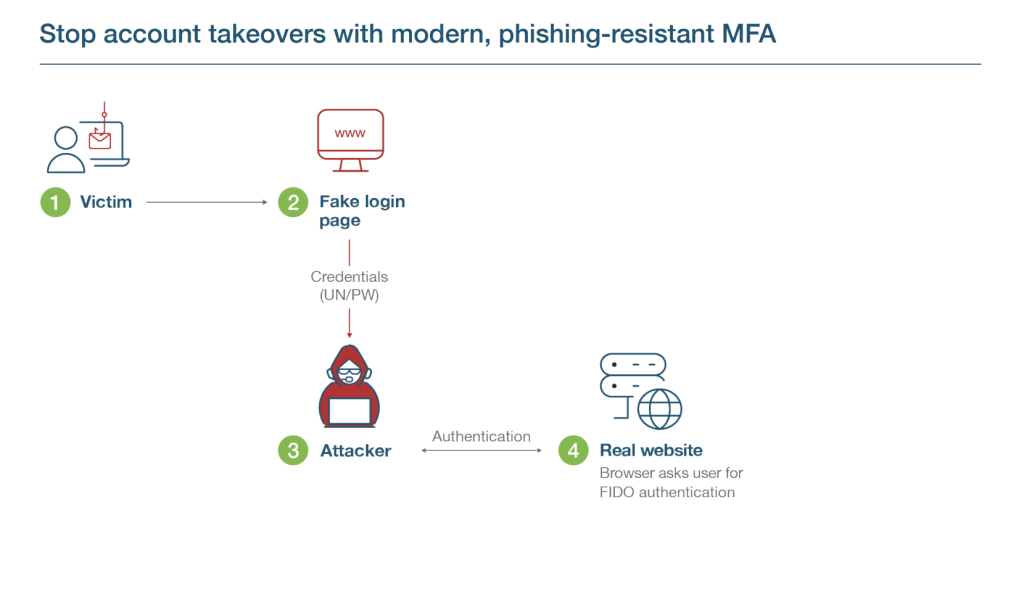
Step 1
- Attacker sends Joe an email pointing to a fake website/login page.
Step 2
- Joe submits credentials (UN/PW).
Step 3
- The attacker through the fake login page gathers credentials and submits it to a real client web portal/login page/website (real server).
Step 4
- Real client web portal invokes MFA (FIDO)… meaning the browser asks for FIDO authentication.
- Joe needs to use a security key (instead of sending an SMS, or use a mobile authentication app).
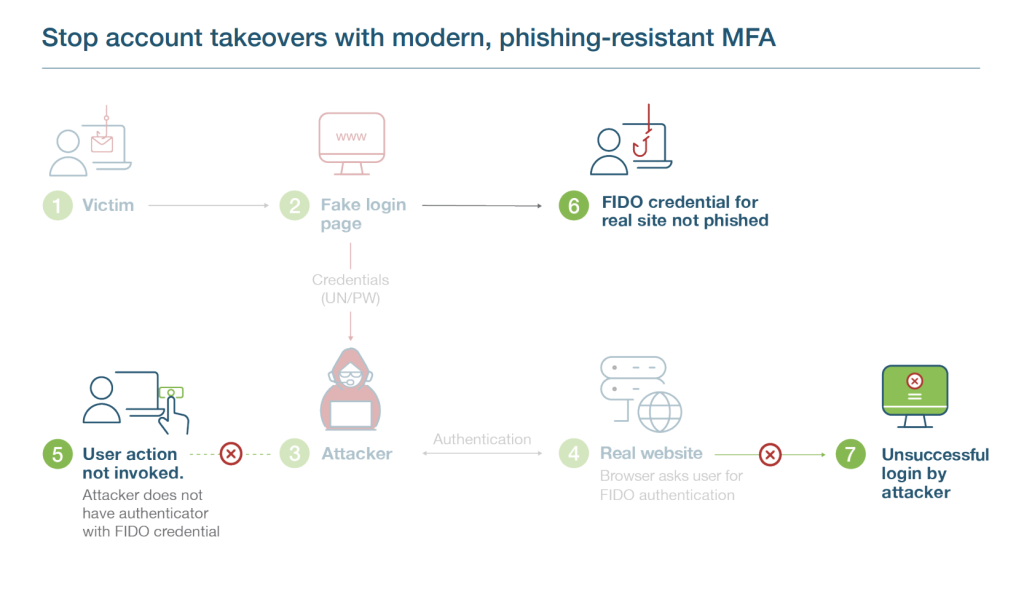
Step 5
- Joe inserts YubiKey (or uses some close proximity/inline method… NFC, BLE, USB).
Step 6
- Real website and FIDO security key has a secret handshake so when a user inserts FIDO security key, the security key understands that a fake website is asking for info.
- Does not allow the user/ authentication process to continue and the phishing attack is thwarted!
- FIDO authentication fails on real website because there is a trusted relationship between FIDO key and the real website.
Step 7
- The attacker is unable to login to Joe’s account and their account remains secure.
The bottomline: Even if the user is fooled, the YubiKey is never fooled!
How to get started on your journey to phishing-resistant MFA at scale