User-centric authentication, the new frontier of enterprise authentication
Passwords are ingrained in every aspect of the traditional IAM identity lifecycle stages. Unfortunately, stolen passwords are one of the largest threat vectors compromising online security. However, more recently, important mandates have come in place for government agencies as well as private sector organizations to harden cybersecurity defenses against phishing attacks by replacing highly vulnerable password-based multi-factor authentication with phishing-resistant multi-factor authentication (MFA) and then ideally to passwordless authentication, eliminating passwords altogether.

Zero Trust Architecture

Adopt phishing-resistant MFA
With recent advancements in passwordless and new on-device authentication solutions, the way an organization can establish and manage a user’s identity credential throughout its lifecycle has evolved.
Traditionally, organizations think of phishing-resistant authentication and not phishingresistant users. The difference lies in thinking about authentication events as points in time as they are logging into sensitive systems, apps, and services versus thinking about how users live and work. Users often move across platforms (Apple, Google, Microsoft) and devices (smartphones, laptops, tablets) and between personal and corporate apps and services in the course of their day. Enterprises need to think of equipping their users with the type of authentication that offers phishing-resistance no matter which business scenario they are engaged in (remote worker, mobile-restricted, shared workstations, supply chain 3rd party etc.) or platforms or devices they are using.
The introduction of passkeys
Passkeys have been introduced by the FIDO Alliance as a way to accelerate passwordless for consumers and organizations alike. Passkeys are now available on every major platform including Google, Apple, Microsoft and web browsers. The development of passkey solutions has created new enterprise identity security events for every enterprise.

FIDO
An open security standard backed by the FIDO Alliance, a group focused on moving away from a passwordbased system.

Credential
The unique ID a user has that “gets you through the gate” when you log on to any system.
Organizations and their users often confuse the passkey with the authenticator it resides in. A passkey is simply a FIDO2 credential, and it can live on a smartphone, or another general-purpose device, such as tablets or laptops. Alternatively, they can reside in portable devices which are authenticators purpose-built for security, such as FIDO hardware security keys.
A passkey is the credential itself, a digital file. An authenticator is where the passkey lives. For example, on a phone, laptop, hardware key, or other device.
Passkey

Authenticators
Securing the enterprise user
Users have different authentication needs
Not all enterprise users do the same job everyday. Depending on the needs of the business a user may need to work on a laptop remotely, access their email on their phone during a meeting or access a shared workstation on a manufacturing floor. Enterprise users will have different types of authentication needs and therefore the types of authenticators they should use. An enterprise user may be a remote or hybrid worker, or operate in a mobile-restricted environment where mobile phones simply are not an option. They may also be working on shared workstations where different users need to securely log in and log out, all on the same computer terminal.
Therefore, the type of authenticator the user will need to store their passkeys on may differ based on the sensitivity of their roles, or the type of data or system they need to access. Hardware security keys are portable authenticators purpose-built for security, and allow users to work securely and seamlessly across the widest range of enterprise business scenarios. Alternatively, platform authenticators are built into general-purpose devices such as smartphones and laptops. And finally, mobile applications, such as authenticator apps, offer user authentication solutions as well. All of these authenticators have security and usability tradeoffs. It is up to the enterprise to decide what level of security assurance they need and the level of risk they can live with.
Security keys
Device-bound credentials with Attestation
Platform authenticators
Authenticators built into your devices

3rd party authenticator apps
Applications that provide user authentication solutions
Different passkey classes
Not all passkeys are created equal
Passkeys are more secure than passwords and enable a speedy move to passwordless authentication that enables greater security and efficiency. While there are different passkey implementations, each with its security and usability tradeoffs, not all passkeys are created equal, and not all are ideally suited for the enterprise.
Synced passkeys

Device-bound passkeys (also referred to as hardware-bound)

Synced passkeys
Designed for consumers, not enterprises
Synced passkeys are copyable credentials that are copied across all the devices connected to the user’s account, including their smartphones, laptops and tablets. Synced passkeys can also be shared with or copied to another user’s account. This may create some chilling failure points for the enterprise. Synced passkeys introduce major risks and exposure gaps in key enterprise scenarios such as remote work, supply chain security, compliance, and support complexity. Read more about the pitfalls of synced passkeys for the enterprise.
Device-bound passkeys
Designed for the enterprise user
Device bound passkeys offer enterprises greater control of their FIDO credentials compared to synced passkeys.
However, there are different types of device-bound passkeys. There are device-bound passkeys that reside in general purpose everyday devices such as smartphones and laptops. Device-bound passkeys that live in hardware security keys are known to offer the highest security assurance and provide enterprises with the attestation that lets them prove the security of their credentials. Hardware security keys enable enterprises to build trusted credential lifecycle management processes. Security keys enable enterprise users to register new devices, authenticate to their enterprise passkey providers, and register other device-bound credentials (like Windows Hello or Okta Fastpass) because each user has a portable, phishing-resistant credential for simply and securely authenticating themselves during these processes. This solution removes risk from the help desk and enables enterprises to comply with the most stringent requirements across any industry.
Netting it all out with the passkey toolbox
Different passkey implementations across synced and device-bound passkeys
Users essentially have three types of authenticators that they can use to authenticate using passkeys residing within them The first passkey solution on the market, and the gold standard for authentication, are hardware security keys. Security keys enable users to authenticate with passkeys that are stored on their device and the user is responsible for moving the security key from device to device. It is important to note that purpose-built authenticators solve specific enterprise use cases that authenticators on mobile simply cannot, such as securing mobile-restricted and shared workstation environments, which is critical to many enterprises.
Other emerging solutions on the market are 3rd Party Passkey providers and these applications can be created to help users manage both device-bound or synced passkeys. The launch of synced passkeys in 2021 was complemented by the platforms’ support for these consumer-grade passkeys. The various platforms now support synced passkeys and some of these platforms only allow synced passkeys to be used with their platform authenticators.
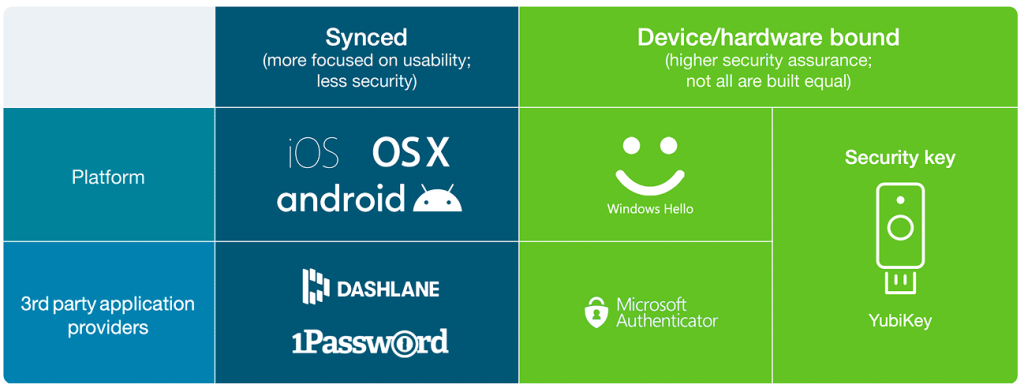
iOS and MacOS, now only support the creation of synced passkeys on their platform. Google Android now also only supports synced passkeys as well. Chrome supports both synced and device-bound passkeys, giving the relying party or service (e.g. Dropbox) a choice as to what they can create. To add to the options, Windows Hello only enables the creation of the passkeys bound to that workstation device. And finally, 3rd party providers, like 1Password and Dashlane, support the creation of synced passkeys for users. There are also solutions on the market that will support software-backed device-bound passkeys, marking yet another development in the emerging passkey landscape..
Passkey terminology soup? Here is the main thing to remember… It’s all about protecting the private key.
Proving where the private key is stored is fundamental to understanding the risk associated with passkeys. The relying party or service can leverage the device attestation included in the credential registration to prove that the passkey is stored on an acceptable device for the enterprise.
All passkeys are based on public key cryptography where there is a key pair with a private key that is securely stored and a public key that is shared or made public. The private key needs to stay private and that is the job of the passkey solution and the underlying system where the passkey resides. Synced passkeys allow for the private key to be copied to multiple devices and to a cloud management system. This makes it difficult for an enterprise to track and trust the passkey. Device-bound passkeys offer greater management and control which an enterprise needs. But only device-bound passkeys residing in portable hardware authenticators specially built for security offer the private key protection enterprises need.
Getting to phishing-resistant users
And not just phishing-resistant authentication
As passkeys are introduced to accelerate the adoption of passwordless authentication, the new goal for enterprise authentication should be to establish phishing-resistant users, not just phishing-resistant authentication. Passkeys should be considered within the context of true user-centric authentication and how users work in the organization. This strategy requires that every user must use a phishing-resistant authentication solution for every authentication task. When the objective moves from phishing-resistant authentication to phishing-resistant users, an enterprise can empower users to register new devices without calls to the help desk and maintain high levels of assurance enabling users to securely work remotely while removing operational risk and security risks for the help desk.
With this in mind, the conversation shifts from choosing the right authenticator (phone vs security key, etc.) to ensuring that every authentication option (and passkey) the user has, is registered securely and meets both the user experience goals and enterprise security needs.
Moving away from passwords and legacy phishable MFA solutions such as SMS, one-time passwords, and mobile authentication means we are moving into a world where users will have multiple credentials, passkeys, and passkey providers. With this change, the credential lifecycle becomes the new inflection point for enterprises that need to manage their critical interactions with the user.
For each user, an enterprise needs a solution for the following events:
- First authentication—first authentication on a new computing device (phone, laptop, or desktop) to securely enroll that device in the device management system
- Credential registration—phishing-resistant registration of synced or device-bound credentials on trusted/managed or untrusted/unmanaged devices
- First authentication to passkey provider—first authentication to passkey provider on a new device to begin synchronization of passkeys to a trusted/ managed device
- Web authentication to passkey provider—authentication to a passkey provider to access passkeys on an untrusted/unmanaged device
- Secure self–service credential management— self-service tool for when an employee
- Loses or retires a managed device that revokes any credentials stored on it
- Needs to recover access to their passkey provider
- Needs to recover access to their platform account
- Needs to manage any existing YubiKeys, and to revoke/mark lost any credentials that will no longer be in use
- Secure self–service authenticator management—a self-service process for ordering additional device-bound passkeys (e.g. residing on a YubiKey) if a user needs a new one to prevent risking account lockout
- Account lockout—a secure process for a user to get a new credential issued for their enterprisemanaged account after losing access to all their authenticators/credentials
The phishing-resistant user and portable passkeys
Phishing-resistance should not be tied to a particular isolated device or platform, but should be able to move with the user, no matter which app, service, or system they are logging into, and across their corporate or private lives. This builds a phishing-resistant enterprise end-to-end. Device-bound passkeys, such as those in a YubiKey, combine the secure cryptography of passkeys on a portable piece of hardware. Using YubiKeys creates phishing-resistant users where strong authentication travels with the user and is not tied to a specific platform or mobile device.
Enterprise considerations when selecting the right passkeys
All passkeys may be phishing-resistant, but not all are ideal for enterprise needs
Many password replacement solutions focus on bringing phishing-resistant authentication to the market, and enterprises are looking to leverage these solutions to replace passwords. However, enterprises must address each phase of the account lifecycle and related enterprise considerations to determine if device-bound passkeys on general purpose devices are adequate, or if device-bound passkeys on authenticators built specially for security would work well, or if a hybrid approach is the right fit. The ideal strategy will make not only key authentication points phishing-resistant, but also give way to creating phishing-resistant users, so that they are protected throughout the various authentication ceremonies, on any device that they love, as they log into their sensitive online accounts through life and work.
Secure onboarding and recovery are a must for enterprises

Onboarding/registration

Credential recovery

Compliance and audit
The MFA that customers decide to implement is only as secure as the registration and recovery. Registration or onboarding processes using phishable methods like sending OTP codes lead to vulnerable MFA deployment. If anyone can register or reset the FIDO credential then it defeats the purpose of using phishing-resistant MFA. Organizations need to have a robust onboarding and recovery solution to bootstrap the enrollment of the MFA method.
Let’s look at how the different device-bound passkey approaches work for a day in the life of a user in an enterprise as they go through onboarding and credential recovery, as well as at the compliance, audit and risk implications of each passkey approach.
1. Onboarding/registration
1a. Onboarding with device-bound passkeys on general purpose devices
3rd party passkey providers; device-bound passkeys on general purpose devices
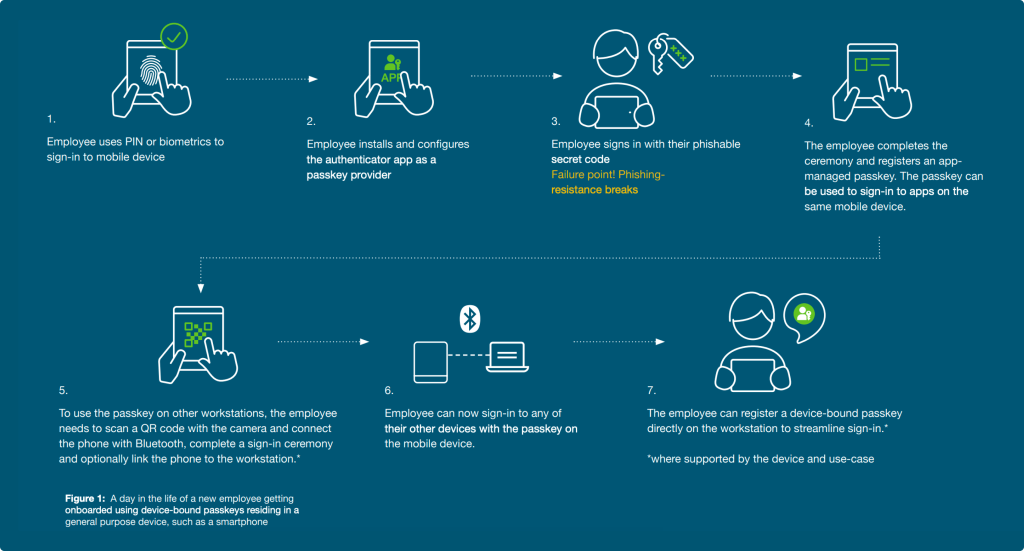
Benefits
No need to purchase or deploy additional hardware
The advantage to organizations is that they may not need to deploy additional hardware to users. The organization can either rely on personal end-user devices or if they are already shipping mobile devices to the users it can be the one and only thing needed.
Challenges
Low-security setup
After the user has installed and configured their authenticator app, they sign into the app with phishable secret. This means that the passkey registration using device-bound passkeys on general purpose devices is of low security right out of the gate. A malicious actor could also fool the user to either share their phishable secret or trick the user into installing a fake or noncompliant passkey app and give the attacker access to the user’s credentials and allow account takeover.
User resistance to use personal devices for corporate security
As mentioned above, while the key benefit to organizations using device-bound passkeys on general purpose devices such as smartphones is that they may not need to deploy additional hardware to users, and solve the security gap with personal mobile devices, this could raise objections from employees who need to install software on personal devices or cause organizations to reimburse employees for requiring the use of their devices. And in the case that Android 14 and iOS 17 are not supported on some end-user devices, it will be a challenge for organizations to know what to do for those employees.
A non-intuitive user experience
The user onboarding experience is not standardized across all platforms and devices, leading to confusion and lost productivity for users. This means that enterprises must invest in detailed user training in order for the adoption of device-bound passkeys on general purpose devices to be successful. Users will often be faced with app installations and configuration which adds overhead and a poor user experience, especially for enterprises with BYOD programs.
Multiple devices / registrations required
To support recovery and an ideal user experience, registration is required on all devices where access to systems is required. And, the user would need a second mobile device or desktop where a separate passkey can be registered for account recovery. This can be frustrating and costly for the enterprise and/or the user.
Limited enterprise use case coverage
Given that these passkeys reside on everyday devices such as mobile phones, there will be limitations on where the authenticator can be used. Therefore in shared workstation or shared desktop scenarios, BYOD, high-security, mobile-restricted, and some offline scenarios and even when older devices and platforms are involved, these types of device-bound passkeys simply may not work to cover all enterprise use cases.
1. Onboarding/registration
1b. Onboarding with device-bound passkeys on authenticators purpose-built for security
There are three possible ways a user can be on-boarded using hardwarebound passkeys.
- Manager or admin registers a FIDO2 security key on behalf-of the end-user
- Employee is sent a factory provisioned pre-registered security key directly to their mailbox
- End-user uses an enterprise-provided password or phishable code to sign-in with to do self-service Here we look at the first two options that provide secure and seamless user onboarding to phishing-resistant MFA and passwordless using device-bound passkeys that reside in security keys (e.g. YubiKeys).
Security keys; device-bound passkeys on authenticators built for security
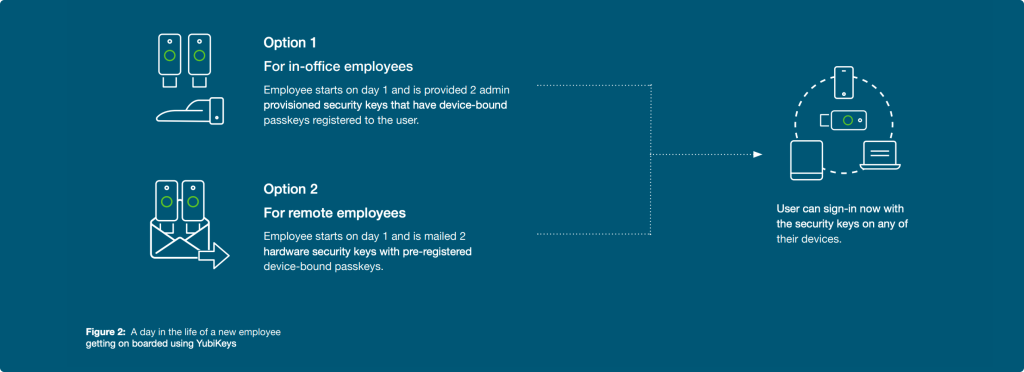
Benefits
Phishing-resistant onboarding
The user or process never involves handling phishable secrets to register the passkey
Consistent user experience
The benefit to organizations with device-bound passkeys residing in YubiKeys is that they provide a consistent user experience across devices and platforms, and the highest assurance security travels with the user with a portable form of strong authentication security, making the user phishingresistant as they move through their day.
Highest assurance security (AAL3)
YubiKeys meet higher security Authenticator Assurance Level 3 (AAL3) requirements, meeting the most stringent compliance requirements. This offers the enterprise strong security and business acceleration with peace of mind.
Challenges
Purchase and deploy a separate device
The main challenge for enterprises is having to purchase and deploy a separate device and send it to users. And this feels complex as it involves the enterprise needing to factor in logistics and distribution. Yubico provides Enterprise Delivery services to support logistics and distribution needs, or an organization can work with their local reseller partner.
2. Credential/account recovery
2a. Credential recovery with device-bound passkeys on general purpose devices
3rd party passkey providers; device-bound passkeys on general purpose devices security
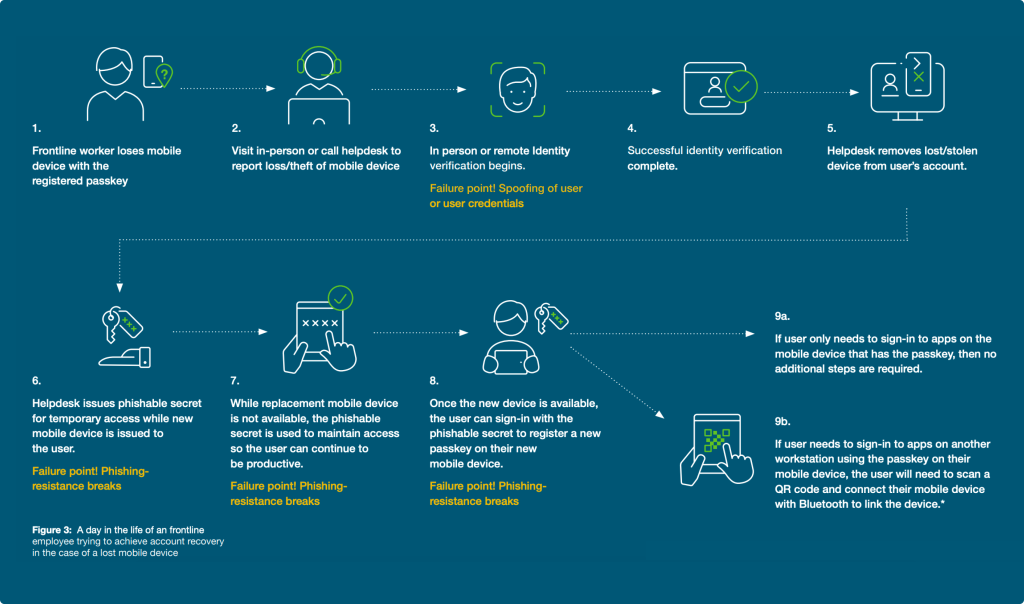
Benefits
Fewer devices for the user— “one less thing to carry”
Users who already have phones can use the same device for productivity and authentication.
No additional cost for hardware security keys
Organizations may be able to avoid the extra expenditure to purchase the highest assurance hardware security keys.
Challenges
Requires multiple devices
If a user has only one device that supports passkeys, the user lockout/account recovery can be costly, risky and a poor experience. Multiple devices must be registered with passkeys to avoid this pitfall.
Poor user experience
If a mobile device is lost or stolen, all workstations that were accessed using that passkey will need to be relinked by scanning the QR code and connecting the mobile device to the workstation with Bluetooth. Reestablishing cross-device access after recovery can involve multiple devices and steps.
Add-on costs for monitoring and management
Device-bound passkeys on general purpose devices typically involve additional software and administrators to manage and monitor the security posture of the mobile device, and the costs can add up.
High recovery frequency
Devices being used in busy public places increase the chances that a mobile phone is more likely to be stolen, misplaced, fail or break. This is far less likely with devicebound passkeys, such as those residing in a YubiKey. Also, it is important to keep in mind that a device-bound passkey residing in a general purpose device, such as a smartphone, can be inadvertently deleted whereas a passkey on a YubiKey simply cannot be accidentally deleted. And finally, it’s important to keep in mind device upgrade cycles, during which time authenticator apps with passkeys may not properly migrate to the users’ upgraded devices. Additionally, OS updates, firmware updates, and app updates can break the passkey flows and not work as planned, and potential vulnerabilities do arise regularly requiring the organization to be diligent in managing and patching devices.
2. Credential/account recovery
2b. Credential recovery with device-bound passkeys on authenticators purpose-built for security
Security keys; device-bound passkeys on authenticators built for security
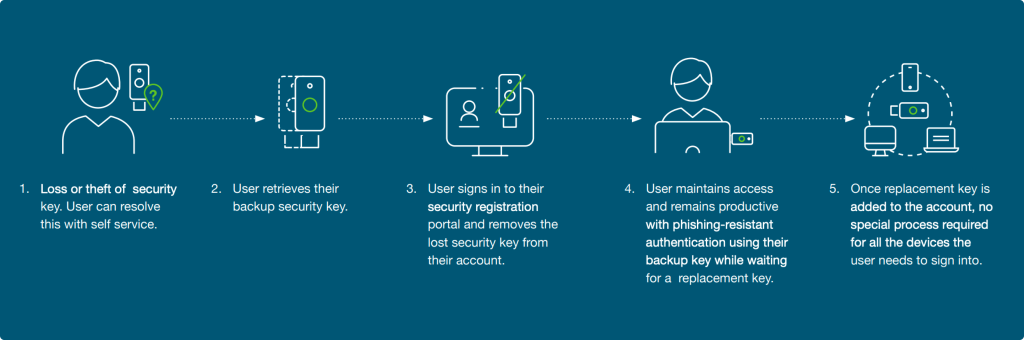
Benefits
Not cost-prohibitive
Compared to having two mobile devices, having a backup security key, such as a YubiKey, is a much smaller cost. And, having a backup YubiKey allows for much faster and simpler self-service recovery.
Always-on phishing resistance
The loss of one security key (containing device-bound passkeys) does not disrupt normal workflow, and nor does it downgrade authentication strength.
Challenges
Need a backup key
If a user loses their security key, it involves a few steps to recover access to the account. Therefore, each user is advised to maintain a second security key as a backup to maintain account access and to provide a phishingresistant method to add a new backup method
YubiKeys make other device-bound passkeys more secure
It doesn’t have to be one or the other: A hybrid approach might suit an enterprise best in key scenarios, like using 3rd party passkey providers for low-risk apps/users or for temporary use during recovery scenarios. Also consider that using a pre-enrolled YubiKey provisioned and delivered to the end user creates the strong binding needed to bootstrap the setup of another type of device-bound passkey within a 3rd party passkey provider. This significantly raises the bar for security and usability creating a robust credential lifecycle strategy that an organization can build upon.
Additional enterprise considerations
Compliance, audit and risk
Compliance and audit with device-bound passkeys on general purpose devices
Challenges

Limited attestation abilities; hard to determine which devices/hardware are protecting passkeys

Device-bound passkeys on general purpose devices, such as smartphones or laptops or tablets only meet AAL2

Does not meet strictest compliance and certification needs
Compliance and audit with device-bound passkeys on authenticators purpose-built for security
Benefits

Hardware authenticator attestation offers the most confidence that passkeys are stored securely on known trusted hardware with known properties
Device-bound passkeys on YubiKeys are the only ones that meet AAL3

Meets strictest compliance and certification needs
YubiKeys satisfy Federal mandates for highest security assurance
YubiKeys are allowed in secured areas where mobile devices are prohibited
YubiKeys can help when government agencies have legacy or custom built systems that are not compatible with device-bound passkeys on general purpose devices.
Risk and cost exposure
Generally there is a greater level of risk of lost, stolen or compromised mobile devices as users use these devices for a wide range of activities. Passkeys residing on general purpose mobile devices run a greater risk of being compromised when compared to passkeys residing on authenticators purpose-built for security, such as hardware security keys. Replacing a smartphone is far more costly than replacing a security key.
General purpose devices for security
Risky users
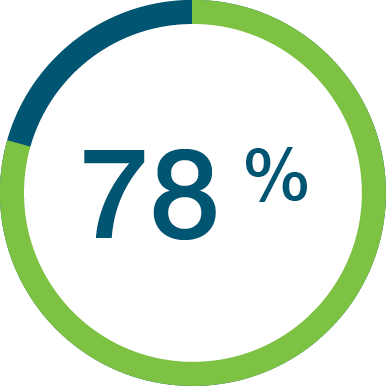
of users used their work device for personal activities.
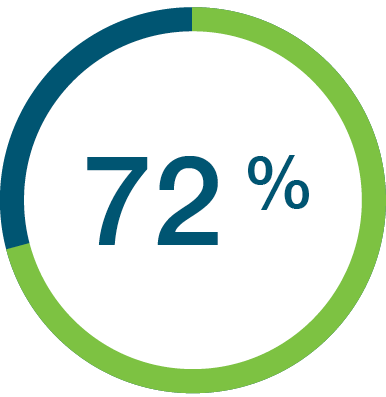
use personal devices for work.
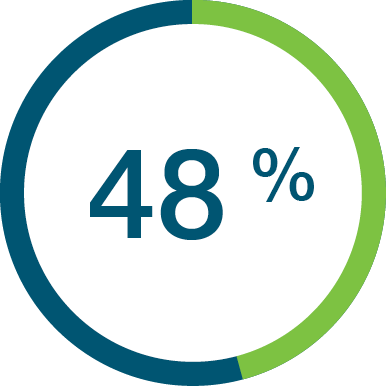
let a friend or family member use the device.
The YubiKey— Raise the bar for security for all other passkey providers
As enterprises look to removing passwords from their users’ daily lives, the YubiKey can offer a simple, secure and portable way to increase security. Users can use the YubiKey to authenticate to their workstations, and then unlock their passkey providers (both platform and 3rd party) and raise the bar for security for their passkey applications.
Device-bound passkeys residing in YubiKeys provide the highest level of assurance on how the private key is managed based on the built in FIDO attestation standard. The YubiKey ensures that the private key is stored and protected within a purposely built security hardware module. Other forms of device-bound passkeys need to rely on less reliable approaches to provide information about the security and control of the private key. The lack of visible controls might not meet enterprise needs to meet compliance regulations or necessary security standards.
Summary
Key passkey takeaways for your enterprise
Passkeys offer a FIDO-enabled world but for enterprises that require strict control of user identity, device-bound passkeys living in general purpose devices such as smartphones, laptops and tablets may not lower risk for your organization. Devicebound passkeys that live on security keys offer the highest security assurance and provide enterprises with the trusted credential lifecycle management and attestation abilities they need to have the strongest security, the simplest user onboarding and credential/account recovery experience across devices and platforms, and stay in compliance with the most stringent requirements across industries.
- Look for phishing-resistant authentication methods that can support all areas of authentication and credential management to create phishing-resistant users. Onboarding and recovery flows are common areas where phishing-resistance breaks down and is an attractive attack vector
- There may be some or no attestation for a large variety of different devices. The Service/Relying Party or Enterprise cannot know what type of device was used or know the trust that they can put into the authenticator and how the passkey is stored. It is critical that enterprises be able to trust the passkeys their users use.
- Passkey credentials, such as the ones that reside in modern FIDO security keys, provide a higher degree of assurance than passkeys on a smartphone, While these lower security passkeys offer AAL2 assurance, passkeys in security keys offer AAL3 assurance—highest authenticator assurance Level 3—which is critical for ensuring compliance.