
Why is everyone talking about passkeys?
A passkey is a more secure replacement for passwords, and it stops phishing in its tracks.
What are passkeys?
You might have heard passkeys are new. Not true! A passkey is just a FIDO credential, and those have been around for years. FIDO credentials are good at blocking phishing attacks.

FIDO
An open security standard backed by the FIDO Alliance, a group focused on moving away from a password based system.

Credential
The unique ID a user has that gets you through the gate when you log on to any system.
Why are passkeys so phishing-resistant?

Passkeys pair a public key with an unguessable private key which is never shared.

Every credential is tied to a real URL, which can be verified as legitimate or not.

Every credential is registered to a real human, blocking bots or other remote attackers.
Key Takeaway
Passkeys do not allow users to authenticate on an illegitimate service or website. Attackers are denied access and cannot manipulate a FIDO-enabled passkey.
What’s the difference between a passkey and an authenticator?
A passkey is the credential itself, a digital file. An authenticator is where the passkey lives. For example, on a phone, laptop, hardware key, or other device.

Passkey

Authenticators
What’s the difference between a synced passkey and a hardware passkey?
Synced Passkey
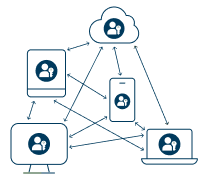
Lives on a smartphone, tablet, laptop or other device where it can be shared and synced across many devices
These passkeys are consumer-grade and ideally suited for low risk users or low value services.
It is also difficult for enterprises to track how and where synced passkeys are being used.

Hardware Passkeys
Can be built in on modern devices or live on specialized hardware security keys and cannot be shared, intercepted or compromised.
Also referred to as device bound passkeys, these passkeys are enterprise grade with the best practice to use hardware passkeys to establish any other types of device bound passkeys. and are easier for the enterprise to track, manage and audit.
These passkeys are also better suited for consumers protecting high risk activities like bank transfers.
Passkeys done right: Top 5 Takeaways

Passkeys beat passwords and setup is everything
Passkeys are more secure and easier to use than passwords, but how you create them matters. Passkeys backed by passwords or synced across devices are vulnerable to theft. For unparalleled security, intuitive use, and unwavering dependability, YubiKeys offer a phishing resistant, hardware backed root of trust that eliminate the inherently confusing and unreliable multi step process seen with accessing passkeys via QR codes on portable mobile authenticators.

Hardware-backed passkeys close the gaps
YubiKeys store passkeys securely on hardware, delivering phishing-resistant, device-bound protection that has been proven to be the highest level of assurance, all while providing evidence of how and where the passkey is stored

Consistent protection—even when devices are lost
Onboarding and recovery create downstream account recovery risks. Using YubiKeys eliminates the need for weak backup codes or helpdesk resets, ensuring security never gets downgraded—even during device loss or replacement.

Better together with built-in passkeys
YubiKeys complement passkeys on Windows Hello for Business, delivering convenience backed up with the durability and trust of the YubiKey to achieve cyber resilience and peace of mind.

The world’s most trusted brands are already there
Global organizations like T-Mobile, Hyatt, Cloudfare, Okta and others rely on YubiKeys to deliver phishing-resistant protection at scale.